Let me tell you something — I used to dread video editing.
I have to explain I have zero formal video editing or graphic designing experience. But I have had a dab at this previously when I was studying in 2007 and then after than work happened and I got busy in other things. It was not until 2021 when I was home on maternity I tried to get my hands on Instagram editing. And 2024 is when I finally learned a lot but just never implemented.

I write more often, edit even more these days and I came across this gem of an app during one of my research. Showing up through video is non-negotiable if you want to grow these days through any media. If you look up a search on google the first searches are video formats. Hence It was imperative I find something that is less time consuming
That’s when I found InVideo, and honestly? It has been a Total game-changer especially the Invideo Studio and Generative AI portion.
Now I can turn my ideas into clean, scroll-stopping videos in minutes — even with zero fancy editing skills. I have to admit I am not a tech expert but I have used this video multiple times to create videos based on just the script. And I intend on exploring more aspects of this app as a mom of two and bring it to you.
What is InVideo?
InVideo is an online video editor that makes video creation so easy — even if you’re not tech-savvy. It has thousands of templates, drag-and-drop tools, and AI features that do the hard work for you.
✨ Oh — and the best part?
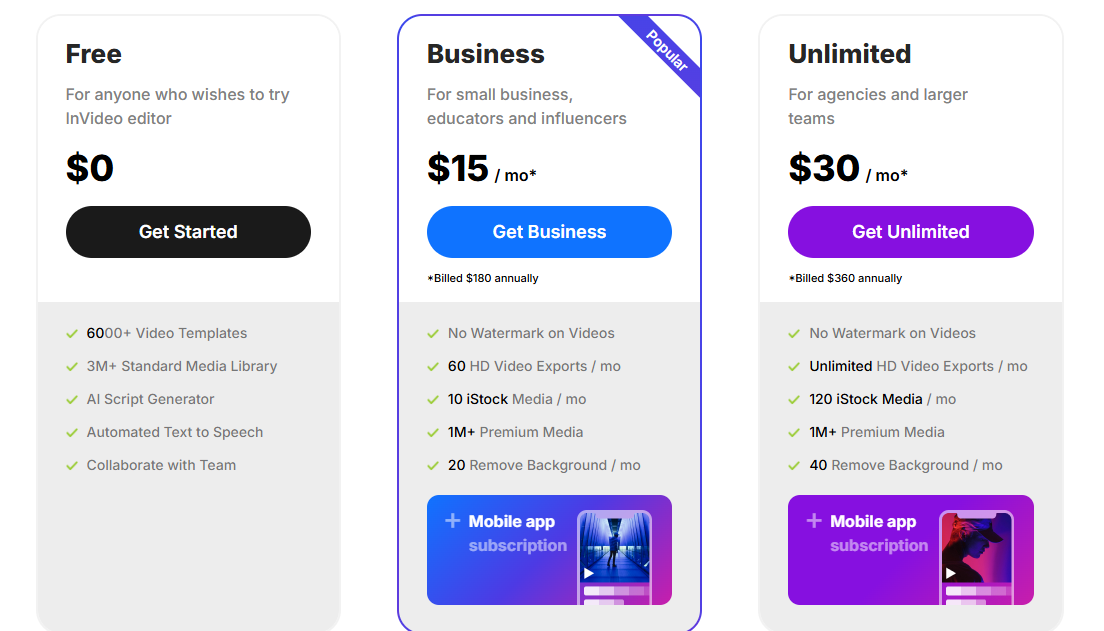
👉 You get 10 free videos every month (less than 10 min each) on the free plan. No credit card. No watermarks on the paid plan. Just free, clean content.
Click here to try InVideo free + get your 10 monthly videos
Here’s Why I Love It (And Intend on bringing all its features to you as a mom and not a techie)
1. You get 10 FREE videos every month
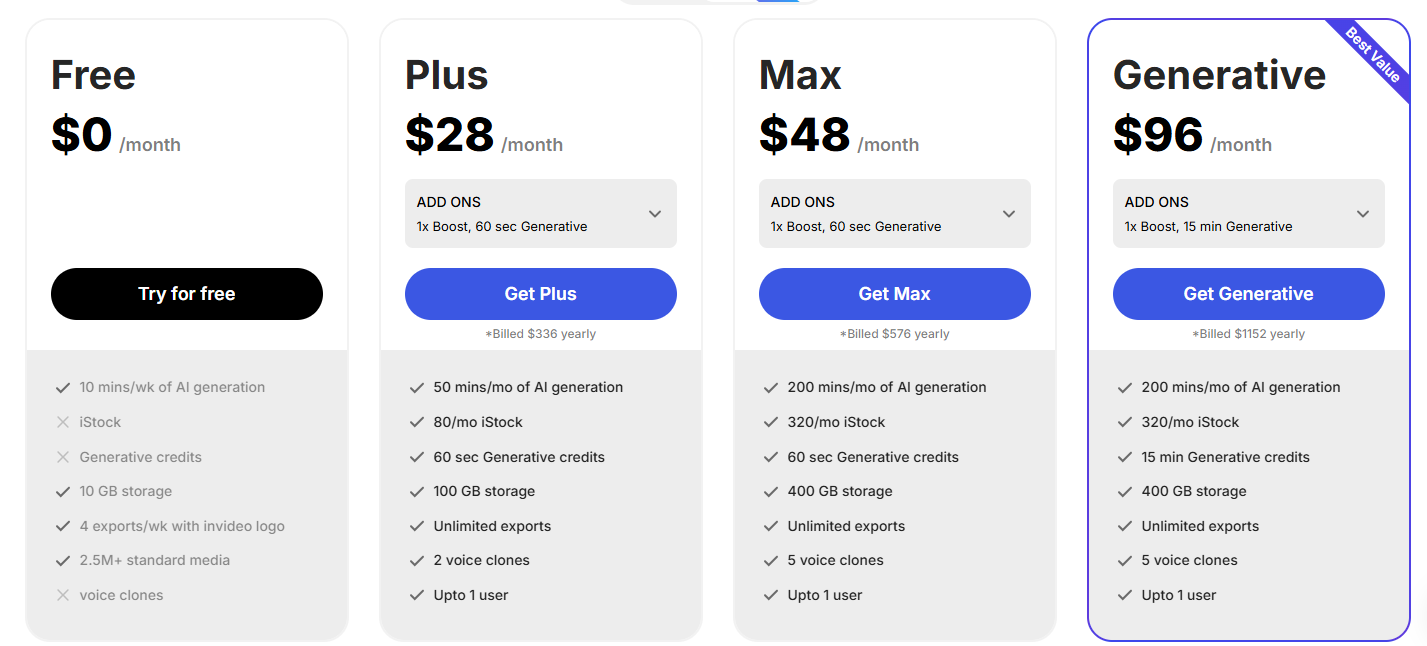
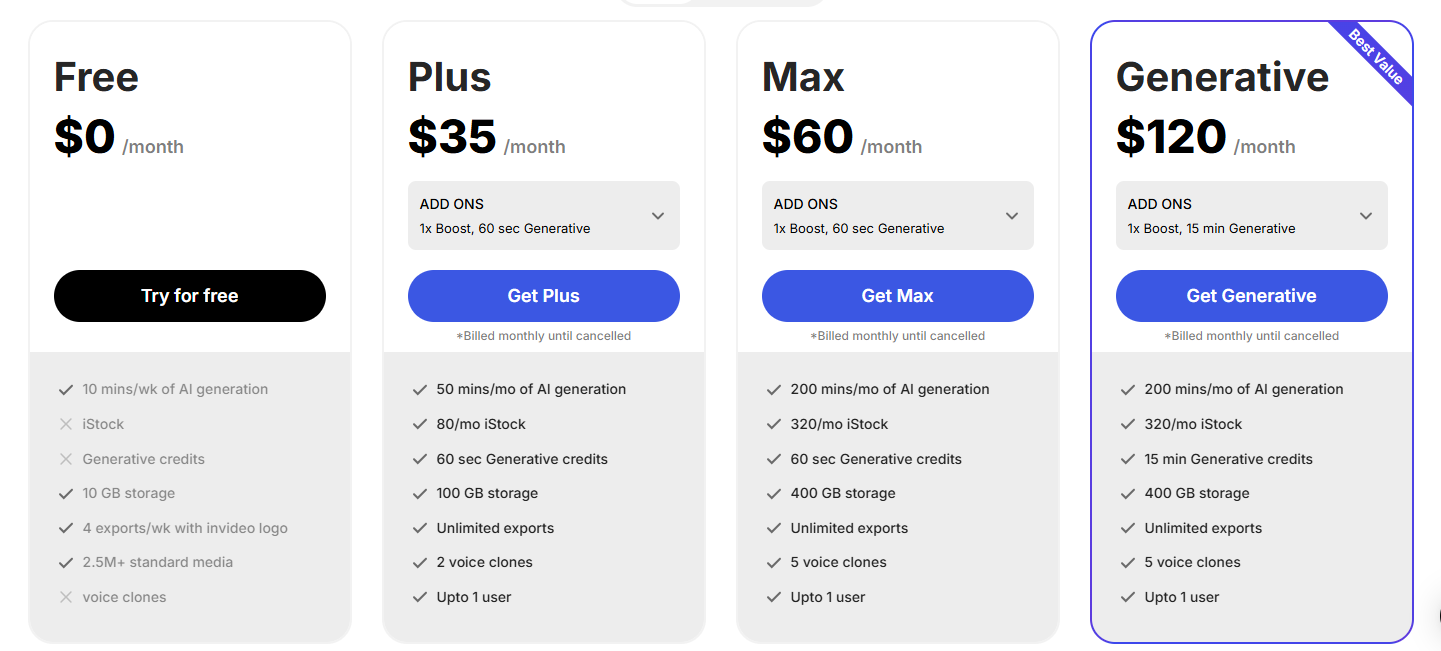
We all love free. A complimentary breakfast, a buy one gets one free offer. Don’t we? Therefore, this app is wonderful. You can start with the free plan and honestly that is definitely limited but you can build your portfolio with the free app and then move on to the paid version. Or if you are determined and have a plan set up you can begin with the paid version. They had multiple offers for first time buyers.
2. It’s beginner-friendly
Simple is in. We don’t like complicated anymore, do we. With Invideo there is no timeline dragging, no advanced editing. I literally just pick a template, add my quote or message, drop in a video or image, and download. Even users with limited video editing experience can easily navigate the platform and create professional-looking videos.
3. It has AI video creation (yes, really)
Is AI going to take the jobs? Don’t we come across this every single day? This will be your first experience integrating AI into video editing and understanding it. The script to video is one of the best and the easiest parts to use for video creation. Write your script or even a few lines of text — and it’ll turn it into a full video with visuals and transitions. And Invideo will ask you for edits according to your liking before you export the video to publish. I use this to repurpose my blog content! Invideo AI can transform text prompts or scripts into fully realized videos, complete with visuals, voiceovers, and music.If you don’t have a script, the platform can help generate one based on your topic. It can find and incorporate relevant stock footage and images, add transitions, and even generate subtitles
4. Built for social media
I can create vertical or horizontal videos instantly. Plus, there are templates designed specifically for Instagram, TikTok, and YouTube. Invideo AI automates many aspects of video production, saving you significant time and effort. The platform’s AI capabilities make video editing accessible to everyone, regardless of their technical expertise. Invideo AI offers a free plan and affordable paid plans, making it a cost-effective alternative to traditional video editing software or hiring video production professionals.

5. Huge stock media library
Editing needs stock media. Creating content everyday is amazing but when you are a mom and just starting out you need a lot of free. You won’t have to go searching — it’s all built in and royalty-free. Invideo has over 16M+ stock videos. You get to access a vast library of stock images and video clips to enrich your videos. You can collaborate with team members on video projects in real-time and can create and translate videos into over 50 language.
How I Use It
- I turn quotes and affirmations from my Instagram into reels
- I reuse old blog posts and create short narrated videos from them
- I trim and repurpose TikToks for YouTube Shorts
- I make little video stories around motherhood, growth, and mindset — with no stress
And best of all? It takes me 10–15 minutes per video, start to finish.
Want to Monetize It Too?
This is a bonus — but you can also earn by sharing InVideo as an affiliate. That means every time someone signs up through your link, you get paid.
If you’re already creating content or helping others grow, this is a sweet passive income opportunity.
👉 Here’s my affiliate link if you want to try it out
Final Thoughts
If you’ve been avoiding video content because it’s too overwhelming — I get it. I was there. I started at a point where I was recording every single day for every single post or reel. Now with the help of this software I can reuse the same content in long form or short form with various edits. Because I came across Invideo, I started showing up more confidently and consistently. And that’s when things started to grow.
You don’t need to be perfect. You just need tools that support your creativity, not slow it down.
🎥 Ready to create videos the easy way?
👉 Click here to try InVideo for free – 10 free videos/month
Do you want video format explanation of how to create videos for Tiktok, Youtube and Instagram using InVideo?
Be on the look out for my next blog post.
 Vishlesha Rana Dreams
Leave a comment